Show clients their retouched portrait before they pick a package
Upload the session proof you already shot. Makeover generates a smoothed-skin, color-corrected, blemish-free preview in seconds — the client's own portrait, not a sample from your studio wall, sitting next to the raw proof at the ordering counter.
Custom-built for your industry · No commitment
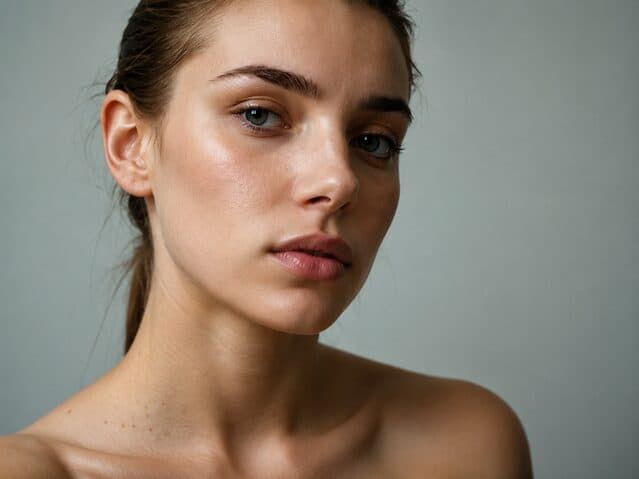
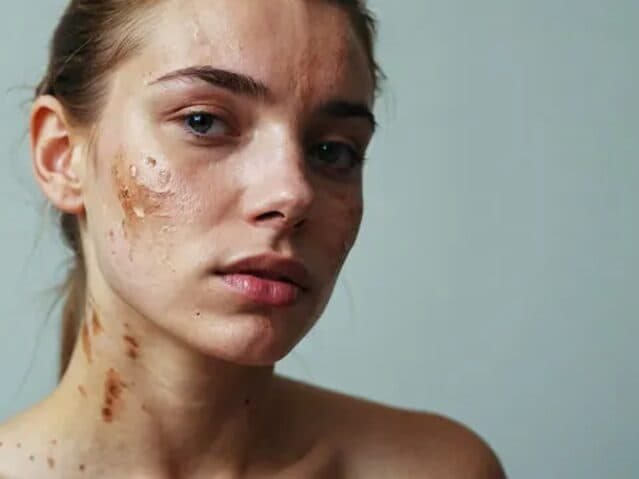
Drag the slider to compare
What is a portrait enhancement preview?
A portrait enhancement preview tool uses AI to generate a retouched, print-ready version of a client's own portrait directly from the session proof. The photographer or sales consultant uploads the raw image, and the tool produces a side-by-side comparison showing skin smoothing, blemish and red-eye removal, color and lighting correction, and backdrop cleanup — the same fixes a retoucher applies to a final print, visible before the client commits to an order. Portrait studios, school photography companies, and headshot photographers use this at the point of sale to turn a hesitant proof-viewing appointment into a package upgrade.
Why it matters
A portrait sitting fee runs $50 to $300, but the real revenue sits in the upsell — canvas prints, albums, and multi-sheet bundles that push an order from $150 to $800 or more. That upsell decision happens at one moment: the proofing appointment, when the client is looking at raw images straight off the camera — visible pores, on-camera flash glare, red-eye, the flyaway hair nobody caught during the sitting. Every imperfection in an unretouched proof argues against the bigger package. Show the client the retouched version at that exact moment, before they've mentally downgraded to the cheapest sheet, and the conversation shifts from "is this worth framing" to "which size."
Who uses this
The photographer who runs the sitting usually isn't the one selling the package — that falls to the print consultant or studio sales rep at the proofing appointment, and they're the one who needs the enhanced preview on screen. Studio owners running family portrait chains use it at every proofing session. School photography account reps use it to move parents off the base package on picture day. Corporate headshot photographers use it to get same-day sign-off from an office manager before the invoice goes out, and wedding photographers use it on portrait-heavy packages where the couple is deciding between an 8x10 print and a 24x36 canvas.
Heard this from a client?
The client flips through raw proofs straight off the camera — on-camera flash glare, visible pores, a red eye nobody caught — and downgrades from the $650 package to a single 5x7 because the unretouched version doesn't look worth framing.
It's school picture day and the collar is crooked, the kid blinked, or a flyaway hair is stuck to their forehead. Parents check the box for the cheapest package instead of the deluxe bundle because there's no time to retouch 300 students before ordering closes.
A corporate client wants the headshot on a clean gray backdrop for the company directory, but the session happened against the studio's patterned backdrop, and they hesitate to approve the invoice without seeing the swap first.
How portrait enhancement previews work
Three steps. Under 10 seconds. No design skills needed.
Upload the session proof
Any raw image straight off the camera or from your existing proofing gallery — no extra shoot, no special lighting setup required.
AI generates the retouched preview
The model smooths skin texture, corrects color and exposure, removes blemishes, red-eye, and flyaway hair, and can swap the backdrop — the standard fixes your retoucher would apply to a final print.
Present it at the ordering session
Raw proof next to retouched preview, on the same screen the client is already looking at. The package conversation happens with the better version in front of them.
Common questions about portrait enhancement
Straight answers. No jargon.
Let's build the version made for your business
Every preview on this site is a variation of the same engine, tuned to one industry. Tell us about yours, and we'll show you exactly what we'd build for it.
We reply within one business day